Sending and Receiving BTRFS Snapshots
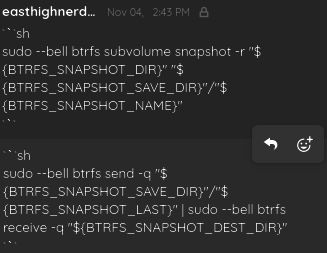
Both messages above, sent through bebopfederation.org XMPP service are bash scripts, the first demonstrating a command for taking a snapshot of a subvolume, and the second demonstrating a command for sending and receiving snapshots. A snapshot is a read-only subvolume that is a copy of, or link to. the original subvolume, such that data at the moment of the snapshot creation can be returned or reverted to if there are changes in data past that moment for the original subvolume.
Creating a Snapshot
To create a snapshot, you execute the following:
sudo btrfs subvolume snapshot -r "${BTRFS_SUBVOLUME_DIRECTORY_PATH}" "${BTRFS_SNAPSHOT_SAVE_DIRECTORY_PATH}"/"${BTRFS_SNAPSHOT_DESIRED_NAME}"The abbreviated subcommand option r stands for “read-only.¨
Sending / Receiving a Snapshot
To send and receive a snapshot, the following is executed:
sudo btrfs send "${BTRFS_SNAPSHOT_SAVE_DIRECTORY_PATH}"/"${LAST_BTRFS_SNAPSHOT_NAME}" | sudo btrfs receive "${BTRFS_SNAPSHOT_DESTINATION_DIRECTORY_PATH}"Given send and receive are mutually exclusive subcommands for the btrfs command, two commands are instead run in succession, with one piping its output into the next. The one that pipes its output into the next is the btrfs send command line, and the one that takes in that input is the command line btrfs receive.
Snapshot Naming Tip
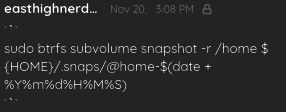
Snapshot names should begin with an ampersand character, e.g. @, and then a directory-relevant name, followed by a dash postfixed with a timestamp, e.g. -20241221042630, which should be created dynamically. Thus, insert $(date +%Y%m%d%H%M%S) as that timestamp postfix for the command creating the snapshot. Example:
BTRFS b-tree_file-system file-system bash_script bash_scripting command_line command_line_interface terminal teletypewriter teleprinter TTY system_administration storage_device sub-volume sub-volumes filepath file_path unix_pipe unix_piping
bibliography
- Laufert, Jean. Letter to Alex Tavarez, November 4, 2024.
- Laufert, Jean. Letter to Alex Tavarez, November 20, 2024.